
Scan Setup
The market scanner is the primary tool in Funding History Search. It bulk-fetches historical funding rates for all tickers and computes the spread between every exchange pair in a single request.
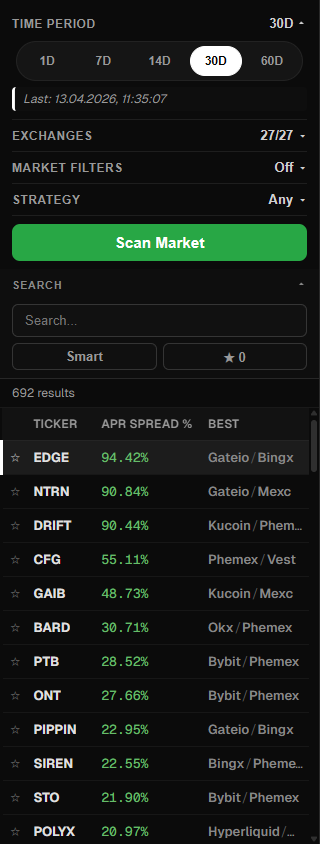
Period
Choose the time range for analysis:
| Preset | Description |
|---|---|
| 1d | Last 24 hours — current market snapshot |
| 7d | One week — medium-term trend |
| 14d | Two weeks — rate stability over a longer window |
| 30d | One month — long-term picture |
| 60d | Two months — maximum range for the most conservative analysis |
| Custom | Pick exact start and end dates using datetime pickers |
Which Period Should I Choose?
- 1d — for quick trades when you need the live funding rate right now
- 7d to 14d — the optimal balance: sustainable spreads are visible and temporary spikes are filtered out
- 30d to 60d — for a conservative approach when long-term rate stability matters most
Maximum Period: 60 Days
The scanner enforces a maximum analysis period of 60 days. If you select a custom range exceeding this limit, you will see a warning modal.
Exchange Selection
Funding History Search supports 27+ exchanges. The scanner requires a minimum of 2 selected exchanges to compute a spread.
- Select All — select every exchange with a single click
- Click individual exchange names to toggle them on or off
- A counter shows the number of selected exchanges vs. total available
The more exchanges you select, the higher the chance of finding a profitable spread — but scan time will increase proportionally.
Strategy Mode
By default the scanner finds the best exchange pair for each ticker (best long + best short). Strategy mode lets you fix one side of the trade:
Strategy mode parameters:
- Exchange — the exchange where you want to hold a position
- Direction — long or short
Example: you set Binance / Short. The scanner will then find the best long exchange for each ticker and calculate the spread relative to your short position on Binance.
This is useful when:
- You already have an account on a specific exchange
- You prefer a particular exchange for its liquidity or fee structure
- You want to see opportunities anchored to a single platform
Market Filters
Filter out low-liquidity tickers before analyzing results:
| Filter | Description |
|---|---|
| Min OI | Minimum Open Interest in millions of USD. Excludes tickers with insufficient open interest |
| Min Volume | Minimum 24h trading volume in millions of USD. Excludes low-volume tickers |
These filters are applied post-scan — all tickers are fetched, but only those meeting the thresholds are displayed in the results list.
Recommended Minimums
For most strategies, setting Min OI to $1M and Min Volume to $1M filters out the riskiest low-liquidity tickers while keeping the majority of tradable opportunities.
Launch and Progress
Click Scan Market to start. During the scan you will see:
- Elapsed time in seconds
- A spinning indicator
- A Cancel button to abort the request at any time
The scan fetches all tickers in a single bulk API request (/api/scan), making it much faster than scanning tickers one by one.
Result Caching
Scan results are automatically saved to the browser's localStorage, keyed by the period type. The next time you open the app with the same parameters, data will load instantly without another request. The timestamp of the last scan is shown next to the period selector.